USBIP
USB/IP provides remote connection of USB devices. USB devices can be connected to a server and clients can access the device over the network. This can be used to attach physical USB devices (webcam, microcontrollers, SBCs, etc) to development VMs.
The USB/IP protocol follows a client/server architecture where the server experts USB devices that client can import. The device driver for the exported USB device runs on the client machine.
Environment Description
- Complete environment is hosted on proxmox.
- USB device
Logitech Webcam C270is connected to proxmox host and pass through to Alpine Linux VM. - Alpine Linux VM runs the
usbipserver component and exports the webcam over the network. - Win11 VM runs the usbip client and "mounts" the webcam from Alpine.
- The
usbipclient emulates a USB AHCI controller with the virtual device connected. - Win11 camera app will detect the webcam as if it were local and display the video.
Config Steps
Step 1: Physical Webcam Connection
Connect the USB Logitech Webcam C270 to the proxmox host and use lsusb to confirm that it is detected. Note the USB device ID 046d:0825, this will be used later.
root@mox:~# lsusb
Bus 002 Device 001: ID 1d6b:0003 Linux Foundation 3.0 root hub
Bus 001 Device 003: ID 8087:0a2a Intel Corp. Bluetooth wireless interface
Bus 001 Device 002: ID 046d:0825 Logitech, Inc. Webcam C270
Bus 001 Device 001: ID 1d6b:0002 Linux Foundation 2.0 root hub
Step 2: Add the USB webcam to Alpine VM
To the Alpine Linux VM, adding the USB device (webcam). Use the device ID from step 1.
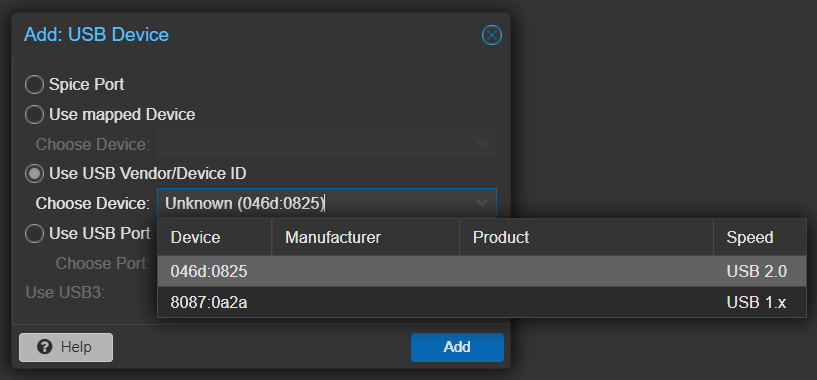
Steps:
- Add USB Device to Alpine VM
- Use USB Vendor/Device ID: 046d:0825
Step 3: Alpine VM USBIP Server Setup
# Install required usbip packages
apk add --no-cache linux-tools-usbip
apk add --no-cache hwdata  # optional, for USB device details

# Install the kernel module and start the usbip daemon
modprobe usbip-host
usbipd -D

# Bind the webcam to usbip daemon and export the device
usbip list -l     # list local USB devices which can be exported
# #TODO: show command output

usbip bind -b 9-1 # bind USB bus 9-1 (camera)

usbip list -r localhost  # show successfully exported devices
# #TODO: show command output
Step 4: Win11 VM USBIP Client Setup
- Download and install the latest usbip-win release: https://github.com/cezanne/usbip-win/releases
- Extract zip file into c:\temp\usbip
- Start "Administrator command prompt" and run:
usbip install

# Alpine usbip server is 10.1.2.213
usbip list   -r 10.1.2.213
usbip attach -r 10.1.2.213 -b 9-1
Bugs
Alpine usbip-host kernel module panics and stops running after few mins. Restarting the daemon and publishing the webcam again will make it work for a few minutes.
# dmesg output showing usbip-host kernel bug
[  766.722519] usbip-host 9-1: unlinked by a call to usb_unlink_urb()
[  766.722541] ==================================================================
[  766.722543] BUG: KFENCE: use-after-free read in stub_rx_loop+0x52c/0xeb0 [usbip_host]
Workaround to try is to use Ubuntu usbip server instead of Alpine VM. Ubuntu has multiple packages that offer usbip, need to test and verify the correct one.